
In This Article
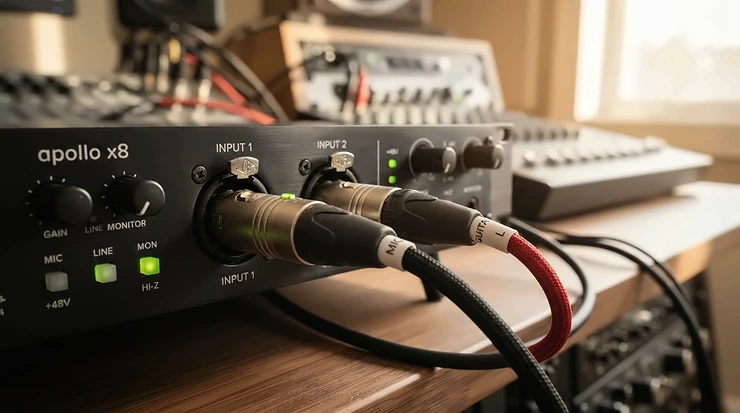
An audio interface for singer songwriter with guitar recording is a compact box that sits between your microphone, your guitar, and your computer. It supplies a clean microphone preamp, a high-impedance instrument input, phantom power for condenser mics, and low-latency headphone monitoring, so vocals and guitar land in your DAW sounding like music instead of mush.
Here’s the problem nobody prints on the box: a singer-songwriter is a one-person band with a one-person budget. You need a mic that flatters your voice, a guitar signal that doesn’t sound like it’s coming through a tin can, and headphones that let you hear yourself now, not a few milliseconds ago. Get one of those wrong and the take feels off before you can say why.
That’s why choosing an audio interface for singer songwriter with guitar work isn’t about chasing the longest spec sheet. It’s about the handful of features that decide whether you finish songs or fight gear. In this guide I compare seven real, currently sold models using manufacturer specs, retailer spec sheets, and published reviews from outlets like Sound On Sound, MusicRadar, and Premier Guitar. I haven’t handled these units myself, so you’ll get analysis and aggregated review themes, not invented war stories.
If the phrase Hi-Z input is new to you, Samson’s primer is a quick, readable explanation of why it protects your guitar tone. Prices below are ranges, so always check current pricing before you buy.
Quick Comparison: 7 Interfaces for Singer-Songwriters Who Play Guitar
| Product | Guitar + Vocal Inputs | Standout Feature | Price Range (check current) | Best For |
|---|---|---|---|---|
| Focusrite Scarlett Solo 4th Gen | 1 XLR mic + 1 quarter-inch Hi-Z/line | Air mode, Gain Halos | $150-$170 | First-time solo songwriters |
| Focusrite Scarlett 2i2 4th Gen | 2 combo inputs, Inst switch | Auto Gain, Clip Safe | $200-$230 | Best all-rounder |
| Audient EVO 4 | Combo mic/line + dedicated instrument input | Smartgain | $130-$180 | Set-and-forget simplicity |
| Universal Audio Volt 276 | 2 inputs, INST switch on each | Vintage preamp + 76 compressor | $270-$300 | Tone-shapers |
| PreSonus AudioBox GO | 1 combo mic/line + 1 TS instrument | Pocket-sized body | $100-$135 | Travel and tight budgets |
| Arturia MiniFuse 2 | 2 combo inputs, instrument level | MIDI + USB hub | $150-$250 | Songwriters with keys or MIDI gear |
| Steinberg UR22C | 2 combo; Hi-Z on input 2 | DSP effects in monitor mix | $150-$200 | Singers who want reverb in the cans |
Looking at the table, the Scarlett 2i2 is the safest default because both inputs flex between mic, line, and Hi-Z. The EVO 4 and AudioBox GO undercut it on price, while the Volt 276 charges extra for hardware character you can’t add later. Budget buyers should note that the Scarlett Solo and AudioBox GO each carry just one true mic preamp, which limits two-mic setups.
💬 Just one click — help others make better buying decisions too!😊
Top 7 Audio Interface for Singer Songwriter with Guitar Options: Expert Analysis
Every pick below handles a microphone and a guitar at the same time, which is the non-negotiable job here. What separates them is how they handle gain, monitoring, and everything you’ll forget to think about until a take goes wrong.
1. Focusrite Scarlett Solo 4th Gen — best first interface for solo songwriters
Simplicity is the pitch: one XLR mic input, one quarter-inch Hi-Z input, and nothing to distract you from the song.
The 4th-gen preamp, 24-bit/192 kHz conversion, and roughly 120 dB of dynamic range (per retailer spec sheets) mean a quiet noise floor, which matters when you’re capturing a whispered verse beside a nylon-string. Air mode brightens the mic channel, and the multicolor Gain Halos show your level at a glance. Based on the specs, this is a guitar and vocal audio interface built for exactly one performer, one mic, and one guitar. The catch: input one is XLR only, so an acoustic mic plus a vocal mic needs a bigger model. Reviewers consistently praise the fast setup and beginner-friendly level indicators, while the single mic channel is the recurring complaint.
Pros:
- ✅ Records mic and Hi-Z guitar simultaneously
- ✅ Gain Halos make levels beginner-proof
- ✅ Compact, USB-C bus-powered, three-year warranty
Cons:
- ❌ Only one mic preamp
- ❌ Outgrown fast if a bandmate joins
Expect a price in the $150-$170 range; for one-mic songwriters, the value is hard to argue with.

2. Focusrite Scarlett 2i2 4th Gen — most flexible all-rounder
Think of it as the Scarlett Solo‘s older sibling who learned to multitask.
Two combo XLR/quarter-inch inputs each get an Inst switch that toggles line and Hi-Z, backed by a 69 dB gain range and about 120 dB of dynamic range. Auto Gain listens to your performance and sets levels, while Clip Safe watches for peaks (Focusrite says up to 96,000 times a second) and trims gain if you’re about to clip. Here’s what that means in practice: vocal mic plus direct guitar, vocal mic plus a mic on the acoustic, or an acoustic-electric and an electric on one session. Two Air modes add presence or harmonic color. Soundref’s review lists strong preamps, good value, and an intuitive layout as highlights, with the missing 5-pin MIDI socket as its main con. American Songwriter notes the 4th-gen line won Sound On Sound’s 2024 award for best audio interface.
Pros:
- ✅ Both inputs flex between mic, line, and Hi-Z
- ✅ Auto Gain and Clip Safe rescue sloppy levels
- ✅ Air modes add sheen without plug-ins
Cons:
- ❌ No MIDI ports
- ❌ Costs more than one-input rivals
At the $200-$230 range, the Scarlett 2i2 earns its spot as the default recommendation.
3. Audient EVO 4 — Smartgain does the level-setting for you
Press the big green button, play your loudest passage, and the interface sets your gain.
Sound On Sound’s review of the EVO 4 and EVO 8 singled out Smartgain as a genuinely useful idea in a crowded market. The EVO 4 pairs two EVO preamps (58 dB gain range) with converters rated around 113 dB dynamic range at up to 24-bit/96 kHz, plus loopback, configurable direct monitoring, and a dedicated JFET instrument input for guitar. The 96 kHz ceiling is irrelevant for songwriting, since 44.1 or 48 kHz is where nearly every demo lives. If you’re both performer and engineer, automating the gain step removes the most common beginner mistake. TechCrunch called its launch pricing remarkable value, and MusicRadar noted the Scarlett 2i2 is nearly identical on paper apart from the Air button.
Pros:
- ✅ Smartgain automates level-setting
- ✅ Dedicated instrument input for guitar
- ✅ USB-C bus power and an included ARC software bundle
Cons:
- ❌ Capped at 24-bit/96 kHz
- ❌ No tone-shaping extras like Air or compression
Street prices run roughly $130-$180, making the EVO 4 a strong budget-to-mid pick.
4. Universal Audio Volt 276 — vintage warmth with a built-in compressor
This is the one you buy when you want the interface to have an opinion.
Each channel gets an INST switch and phantom power. A Vintage mode emulates the tube-style character of Universal Audio’s 610 preamp, and the 76 compressor, inspired by the 1176, offers three presets including Vocal and Guitar. Add 24-bit/192 kHz conversion, direct monitoring, MIDI, and bus-powered USB. Analytically, the compressor answers the classic songwriter headache: a whispered verse beside a belted chorus. The catch is that analog processing happens before recording, so you can’t undo it later. Premier Guitar’s review praised how dramatically the vintage and compressor circuits change the sound, and Soundref liked the compressor but noted it can add some noise and that there’s no knob to balance input against computer playback.
Pros:
- ✅ Vintage mode and 76 compressor add instant character
- ✅ INST switch on both channels
- ✅ Vintage mode can be switched off for clean tracking
Cons:
- ❌ Compressor can add some noise
- ❌ No monitor-mix knob for direct monitoring balance
Expect the $270-$300 range; it’s pricier than rivals, justified only if you’ll use the hardware color.
5. PreSonus AudioBox GO — smallest body, simplest layout
It’s small enough to live in a gig-bag pocket, which makes the AudioBox GO the travel-friendly pick.
One combo XLR/line input with a PreSonus XMAX-L preamp (about 50 dB of gain, switchable +48V) sits beside a dedicated TS instrument input. Add 24-bit/96 kHz conversion, two balanced TRS outputs, a headphone jack, USB-C bus power, and a Studio One Prime software bundle. That separate instrument jack is the key: you get guitar and vocal at once, and the combo input doubles as a line input for a keyboard. A 50 dB range suits most condensers, but very quiet dynamic mics may run short on headroom. Sound On Sound’s 2022 review emphasized its portability. I couldn’t verify its direct-monitoring implementation in the sources I reviewed, so confirm that spec if zero-latency monitoring matters to you.
Pros:
- ✅ Dedicated instrument input plus mic input
- ✅ Truly pocket-sized and bus-powered
- ✅ Often the lowest price on this list
Cons:
- ❌ Only one mic preamp
- ❌ Maximum 96 kHz sample rate
At roughly $100-$135, it’s excellent value for mobile songwriters and tight budgets.
6. Arturia MiniFuse 2 — MIDI, USB hub, and a smart mix knob
Most rivals ignore your keyboard; the MiniFuse 2 invites it to the session.
Two combo inputs accept mic, line, or instrument signals, and the instrument input measures 1 MΩ on the tip. Preamps offer 56 dB of gain at around 110 dB dynamic range, at up to 24-bit/192 kHz. A 6-LED meter and backlit knobs that turn red when you run hot help you set levels. Direct monitoring comes with a mix control and a mono switch, which suits a mic-plus-guitar session, and a MIDI in/out pair and USB hub round things out. The bundle includes Analog Lab Intro, Arturia FX, and Ableton Live Lite, plus a few trial subscriptions. MusicRadar’s verdict praised how intuitive it is. A measurement-based review found converter performance average for its class and questioned value against cheaper units, and one retailer customer noted low direct-monitoring volume on high-impedance headphones.
Pros:
- ✅ Mix knob blends live input and playback
- ✅ MIDI in/out and USB hub built in
- ✅ Both inputs accept instrument level
Cons:
- ❌ Value debated against cheaper rivals
- ❌ Direct monitoring can run quiet on demanding headphones
Pricing varies widely, roughly $150-$250 depending on retailer; it’s worth it mainly if you’ll use the MIDI ports.
7. Steinberg UR22C — latency-free reverb in your headphones
Singers hate recording dry; the UR22C is built to fix that.
It packs two Class-A D-PRE mic preamps in combo jacks, with a Hi-Z switch on input two (1 MΩ). The mic gain range runs +6 to +60 dB, conversion reaches 32-bit/192 kHz, and a full-metal chassis connects over USB-C. The headline is DSP-powered direct monitoring through dspMixFx, with reverb, channel strip, and guitar-amp effects in your headphone mix. There’s a gotcha: with Hi-Z engaged, the unit expects an unbalanced TS cable and cuts the XLR signal, and Yamaha’s user guide warns to lower your monitors before flipping the switch. Bonedo scored it 3.5/5, crediting its sound and direct monitoring, while a retailer staff review warned the driver and software download step can confuse first-timers.
Pros:
- ✅ DSP reverb and effects with no monitoring delay
- ✅ Class-A D-PRE preamps with wide gain
- ✅ Rugged metal body with MIDI I/O
Cons:
- ❌ Hi-Z available only on input two
- ❌ Software setup can trip up beginners
Expect roughly $150-$200; value is high if you want vocal effects while tracking.
Singer Songwriter Recording Interface Setup: Your First Session, Step by Step
A solid singer songwriter recording interface setup takes about twenty minutes and saves weeks of frustration. Here’s the order that avoids the classic traps.
- Install first, plug in second. Download the manufacturer’s driver or control app before connecting, then use a direct USB-C port rather than a hub.
- Connect the mic, then the guitar. XLR to the mic input; a short quarter-inch instrument cable to the Hi-Z jack. Short cables protect your top end.
- Engage phantom power only for condensers. Leave it off for dynamic mics, and be careful with ribbons, which some designs dislike.
- Turn the monitors down before toggling Hi-Z. Switching impedance can thump, and some manufacturers explicitly warn about it.
- Set your gain. Sing or strum at full intensity and aim for peaks comfortably below clipping in your DAW. Auto-gain features on the Scarlett 2i2 and EVO 4 do this for you.
- Turn on direct monitoring. Blend your live input with playback in your headphones.
- Record a ten-second test. Listen back on headphones and speakers before you commit to a full song.
Maintenance is light: keep drivers current, store the USB cable unbent, and wipe the knobs now and then. In your first 30 days, the biggest mistakes are recording too hot, monitoring through a bloated software buffer, and forgetting to select the interface as your DAW input.
Real-World Scenarios: Which Interface Fits Which Songwriter?
Specs mean little until they meet a life. Here are three scenarios, with the reasoning behind each match.
Scenario 1: The dorm-room demo maker. If you’re a college student recording a few nights a week on a tight budget, you need one mic and one guitar, no frills. The AudioBox GO or Scarlett Solo covers that for the lowest cost, and either fits a backpack. The Scarlett Solo adds Air mode and clearer level meters.
Scenario 2: The acoustic purist with two mics. If you record a vocal mic plus a mic on the guitar, perhaps three times a week in a treated spare room, you need two proper mic preamps. The Scarlett 2i2, EVO 4, and MiniFuse 2 all deliver; the MiniFuse 2 wins if you also track a MIDI keyboard.
Scenario 3: The character chaser. If you want a finished-sounding vocal while tracking, the Volt 276‘s compressor and vintage mode give you that sound at the source. Budget more, and commit to the tone.
If you sing better with reverb in your ears, the UR22C is the odd, brilliant outlier.
✨ Ready to Hear Yourself Properly?
🎧 Take your home recording to the next level with these carefully selected interfaces. Click any highlighted product name to check current pricing and availability. The right box turns a rough idea into a song you’ll want to share!
Guitar and Vocal Audio Interface: Recording Both at Once
A true guitar and vocal audio interface does one thing flawlessly: it lets you perform a song start to finish without punching in each part. That requires two independent paths, one tuned for a mic and one for an instrument.
Two designs exist. The first dedicates one input to the mic and one to the instrument, as on the Scarlett Solo and AudioBox GO. The second uses two flexible combo inputs, as on the Scarlett 2i2, MiniFuse 2, and Volt 276. The first is cheaper and perfectly adequate for a single performer. The second adds room to grow, such as a second mic or a keyboard.
Here’s the part people miss: monitoring. When vocal and guitar arrive on separate channels, you may want to hear them in both ears. Features like the MiniFuse 2 direct mono switch exist for exactly that reason. Also watch for bleed, since a vocal mic placed near a loud guitar picks up both. Headphones, a cardioid mic, and a few feet of distance solve most of it.
If you also plan to mic an acoustic guitar that has a pickup, count your inputs. Mic plus vocal plus pickup is three sources, and that’s where larger siblings of these two-input models earn their keep.
Combo XLR Instrument Input: What It Is and Why It’s Handy
A combo XLR instrument input is a single socket that accepts either an XLR plug or a quarter-inch jack. The interface senses which cable you used, or lets you flip a switch, and adjusts accordingly.
The upside is flexibility. One jack can host a vocal mic today and a guitar tomorrow. The Scarlett 2i2 uses an Inst switch on each combo input to toggle line and Hi-Z, and the MiniFuse 2 offers instrument level on both inputs as well. The UR22C restricts its Hi-Z switch to input two, so plan your routing accordingly.
Two practical rules apply. First, a quarter-inch cable doesn’t automatically mean instrument mode: on some units you must press the Inst button, or your guitar will sound thin and quiet. Second, not every interface offers this layout. The Scarlett Solo keeps separate sockets, and the AudioBox GO pairs a combo mic/line jack with a dedicated instrument jack, which is simpler but less flexible.
For a singer-songwriter, the sweet spot is one combo jack for the mic and one for the guitar, because that combination covers vocal-plus-guitar now and vocal-plus-acoustic-mic later.
Hi-Z Instrument Input: Why Your Guitar Needs It
A hi-z instrument input is built for the weak, high-impedance signal that passive guitar pickups produce. Plug a guitar into a normal line input and the pickup gets loaded down, which dulls the highs and thins the tone. Typical instrument inputs sit around 500 kΩ to 1 MΩ, according to Thomann’s explainer; the UR22C and MiniFuse 2 both list 1 MΩ.
Yamaha’s explanation of direct injection makes the same point from the live-sound side: an instrument connected to a line input won’t sound the way it’s supposed to, and a Hi-Z input or DI solves it. That’s why a built-in Hi-Z jack means you can skip buying a separate DI box.
Practical notes:
- Use unbalanced TS cables. The UR22C‘s guide says Hi-Z mode needs one.
- Keep cables short. Long runs dull passive guitar signals.
- Piezo and active pickups can behave differently; try both modes and trust your ears.
- Don’t swap cables with Hi-Z on and monitors loud.
Every pick in this guide includes at least one hi-z instrument input, but only the Scarlett 2i2, Volt 276, and MiniFuse 2 (via their instrument switches) offer it on both channels.
Direct Monitoring: Hearing Yourself Without Delay
Direct monitoring routes your live input straight to your headphones inside the interface, before the computer ever touches it. That bypasses the round trip that creates latency, a delay that can wreck a vocalist’s pitch and timing. Sound On Sound’s glossary describes zero-latency monitoring as exactly this kind of local, delay-free feed, and Samson’s guide to direct monitoring explains how latency enters the chain.
Implementations differ. The Scarlett Solo and Scarlett 2i2 use a Direct button, the MiniFuse 2 adds a mix control, and the EVO 4 offers configurable monitoring. The UR22C goes further with DSP effects you can hear delay-free. The Volt 276 lacks a balance knob, per Soundref.
The trade-off is that you hear only the dry input, so no DAW reverb, tuning plug-in, or amp sim in your headphones. If you need those, switch to software monitoring and lower your buffer size, or pick the UR22C. Also, some players report discomfort even with tiny delays, so experiment before settling on a method.
How to Choose an Audio Interface for Singer Songwriter with Guitar
What is the best way to choose an audio interface for singer songwriter with guitar? Start from how you actually record, then match the inputs, preamps, and monitoring.
- Count your sources. One mic plus one guitar needs two inputs; add a second mic and you need two mic preamps.
- Confirm a real Hi-Z input. Look for an instrument switch or dedicated jack, ideally around 1 MΩ.
- Choose combo or dedicated. Combo inputs offer flexibility; dedicated jacks are simpler and cheaper.
- Check preamp gain against your mic. Hungry dynamic mics need more gain than a 50 dB preamp may deliver comfortably.
- Prioritize direct monitoring. A mix control or DSP effects make tracking far more pleasant.
- Verify your devices. USB-C bus power, iPad compatibility, and driver support vary by model.
- Weigh software and warranty. Bundles from Focusrite, Audient, and Arturia can save real money on DAWs and plug-ins.
Treat sample rate as a tiebreaker, not a headline. As noted earlier, 44.1 or 48 kHz covers nearly every songwriting workflow, so don’t pay extra for bragging rights.
Common Mistakes When Buying an Audio Interface for Singer-Songwriters
Even careful shoppers stumble in predictable places. Here are the pitfalls worth dodging.
- Buying one input when you need two. The Scarlett Solo is great until you want a mic on the guitar.
- Plugging a guitar into a line input. You’ll get a thin, dull tone; use the instrument setting.
- Ignoring gain range. A quiet dynamic mic and a 50 dB preamp can mean noisy, hot gain.
- Chasing 192 kHz. It inflates file sizes without improving a vocal-and-guitar demo.
- Monitoring through the DAW with a big buffer. Latency makes pitch hard to judge.
- Skipping the driver step. The UR22C and others need the manufacturer’s software to run properly.
- Overpaying for character you won’t use. The Volt 276‘s hardware color is lovely, but only if you’ll lean on it.
The marketing myth to ignore is that “more features” equals “better songs.” A quiet preamp, a proper Hi-Z jack, and reliable direct monitoring beat a dozen unused extras every time.
Audio Interface vs USB Mic and Portable Alternatives
| Option | Strength | Weakness | Best For |
|---|---|---|---|
| Two-input interface (e.g., Scarlett 2i2) | Upgradable; works with any XLR mic | Needs a separate mic and cables | Long-term songwriters |
| Hi-Z-equipped USB mic (e.g., Samson G-Track Pro) | One-box simplicity; Samson says it records vocals and guitar together | Mic is built in, so less upgradeable | Beginners wanting minimal gear |
| Guitar-centric portable (e.g., IK Multimedia iRig 2) | Pocket-sized, iOS-friendly | Built around guitar, so vocals need another route | Mobile guitarists |
| Portable recorder | Capture anywhere, no computer | Limited editing and mixing | Quick song sketches |
A dedicated interface wins on flexibility. You can upgrade the mic later without replacing the whole chain, which is the biggest long-term advantage. USB mics with a guitar input save money upfront but lock you into one microphone. For a serious singer-songwriter, the extra twenty minutes of learning pays off, and picks like the Scarlett 2i2 or EVO 4 will keep working as your skills grow.
Price Range & Long-Term Cost of Your Setup
| Product | Price Range (check current) | Value Verdict | Best For |
|---|---|---|---|
| AudioBox GO | $100-$135 | Best budget and travel value | Mobile songwriters |
| EVO 4 | $130-$180 | Strong value with Smartgain | Beginners |
| Scarlett Solo | $150-$170 | Great one-mic value | Solo recording |
| UR22C | $150-$200 | Good value with DSP effects | Vocal-effect fans |
| MiniFuse 2 | $150-$250 | Value depends on MIDI use | Keys plus guitar |
| Scarlett 2i2 | $200-$230 | Best all-around value | Most songwriters |
| Volt 276 | $270-$300 | Premium for hardware color | Tone chasers |
Ranges reflect research-time listings and vary by retailer. Notice that the cheapest model isn’t automatically the best deal: spreading a Scarlett 2i2 over several years of sessions usually costs less per song than replacing an outgrown single-input unit. Total cost also includes a mic, XLR and instrument cables, headphones, and a stand, often equal to the interface itself.
Warranty and software matter too. Focusrite advertises a three-year warranty, and Adorama lists a 60-month limited warranty for the MiniFuse 2. If you outgrow all of these, Guitar Player’s round-up points toward step-up options from brands like Universal Audio and SSL.
Frequently Asked Questions
❓ Do I need two inputs to record guitar and vocals together?
❓ Can I plug an acoustic-electric guitar straight into a hi-z instrument input?
❓ Is direct monitoring good enough for vocals?
❓ How much should I spend on a singer-songwriter audio interface?
❓ Do these audio interfaces work with iPad or iPhone?
Conclusion: The Best Audio Interface for Singer Songwriter with Guitar
Choosing an audio interface for singer songwriter with guitar comes down to a few honest questions. How many sources do you record? Do you need a proper Hi-Z jack? How do you want to monitor yourself? Answer those, and the shortlist writes itself.
For most songwriters, the Scarlett 2i2 is the safest, most flexible pick. If you want the easiest levels and a lower price, the EVO 4 is a smart alternative. Travelers and budget shoppers should look hard at the AudioBox GO, while the Scarlett Solo remains a tidy choice for one-mic setups. Choose the Volt 276 for tone, the MiniFuse 2 for MIDI, and the UR22C if you hate singing dry.
Whatever you pick, remember that the gear only needs to disappear. The goal is a quiet signal, a guitar that sounds like your guitar, and headphones that let you hear every breath. Do that, and the song takes over.
✨ Found your match?
🎸 Click any highlighted product name to check current pricing and availability. Your next demo is closer than you think. Start recording today!
Recommended for You
- Audio Interface with Loopback for Streaming: 7 Best Picks 2026
- Audio Interface for Hip Hop Producers with MIDI: 7 Proven Picks 2026
- Desktop Audio Interface With Built In Preamp for Ribbon Mics 2026
Disclaimer: This article contains affiliate links. As an Amazon Associate, I earn from qualifying purchases. If you purchase products through these links, we may earn a small commission at no additional cost to you.
✨ Found this helpful? Share it with your friends! 💬🤗
